The best Pinterest pin size in 2026 is 1000 x 1500 pixels, a 2:3 ratio, which is what Pinterest itself recommends. Video pins work best at 9:16 (1080 x 1920 pixels). Pins taller than a 1:2.1 ratio (for example 1000 x 2100) get cut off in the feed, and images can be up to 20 MB on the web.
What is the best Pinterest pin size in 2026?
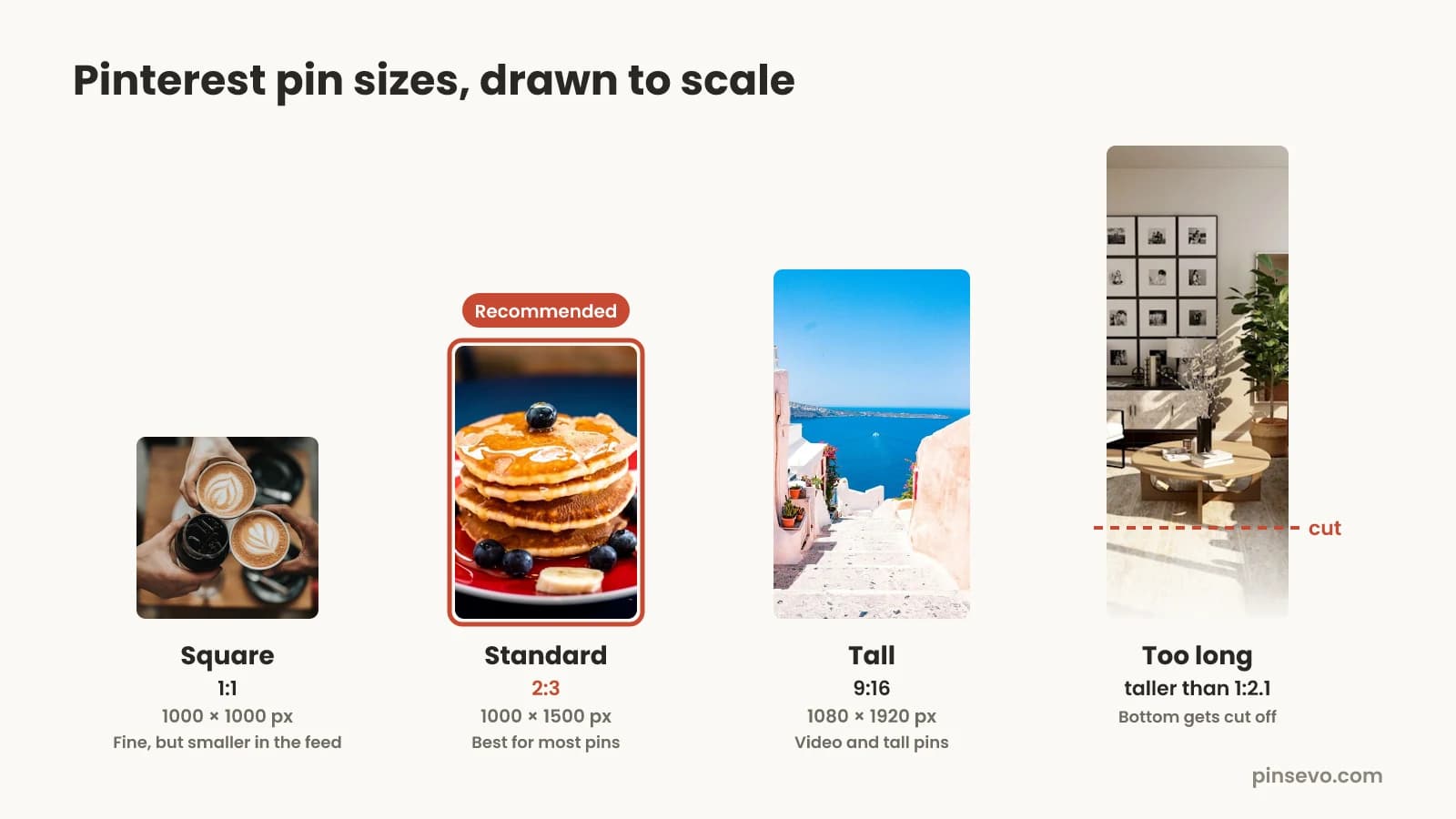
The best Pinterest pin size is 1000 x 1500 pixels. That's a 2:3 ratio: the pin is one and a half times as tall as it is wide. Pinterest recommends this size in its own ads overview, and it's the shape that fills the most space in the feed without getting cut off.
If you only remember one number, remember that one. It works for blog posts, recipes, products, printables and most other pins. The other sizes in this guide are for special cases: video, ads, your profile and your board covers.
Why does size matter at all? Pinterest shows pins in a grid of columns on phones. Every pin in a column has the same width, so the only thing you control is the height. A taller pin takes up more of the screen and is more likely to get noticed. Too tall, though, and Pinterest trims the bottom off. 2:3 sits in the sweet spot.
Pinterest pin sizes for every pin type (full table)
Here are the Pinterest image dimensions and specs in one place. The numbers come from Pinterest's Pin specs page and its ad specs page, checked in October 2026.
| Pin type | Best size (pixels) | Ratio | Notes |
|---|---|---|---|
| Standard image pin | 1000 x 1500 | 2:3 | Pinterest's recommended size for most pins |
| Square pin | 1000 x 1000 | 1:1 | Allowed, but takes less space in the feed |
| Tall image pin | 1000 x 2100 at most | 1:2.1 | Anything taller gets cut off in the feed |
| Video pin | 1080 x 1920 | 9:16 | Also accepts 1:2, 2:3, 3:4, 4:5 and 1:1 |
| Carousel ad | 1000 x 1500 or 1000 x 1000 | 2:3 or 1:1 | 2 to 5 images, 20 MB each, PNG or JPEG |
| Collections ad hero | 1000 x 1500 or 1000 x 1000 | 2:3 or 1:1 | 10 MB max, PNG or JPEG |
| Profile cover | At least 800 x 450 (1920 x 1080 works well) | 16:9 | Business accounts, horizontal image |
| Board cover | Uses one of your pins | Cropped by Pinterest | Pick a pin with the subject in the middle |
| Profile picture | Square image, logo centered | 1:1 | Shown as a small circle |
Image pins can be BMP, JPEG, PNG, TIFF or WEBP, up to 20 MB when you upload on the web. Titles can be up to 100 characters, and Pinterest says only about the first 40 show in feeds.
Pinterest pin size ratio: why 2:3 beats square and 9:16
A ratio is the shape of the pin, written as width to height. 2:3 means for every 2 units of width there are 3 of height. Any size with the same ratio looks the same in the feed: 600 x 900, 1000 x 1500 and 2000 x 3000 are all 2:3.
Here's how the common Pinterest pin size ratios compare:
- 1:1 (square, 1000 x 1000): fine for product shots you already have, but it's a third shorter than a standard pin, so it gets less attention in a busy feed.
- 4:5 (1000 x 1250): the Instagram portrait shape. Pinterest accepts it, and it's a fair choice if you're reusing Instagram images, but it's still shorter than 2:3.
- 2:3 (1000 x 1500): the standard. Tall enough to stand out, never cut off, and it's the size Pinterest recommends for image pins.
- 9:16 (1080 x 1920): the full-screen phone shape. Pinterest recommends it for video. For still images it's allowed, but it's close enough to the cut-off line that text near the bottom can be harder to see in the grid.
- Longer than 1:2.1: the old "long pin" or infographic style. It gets trimmed in the feed (more on that next).
So should a still image be 2:3 or 9:16? For most people, 2:3. It's the size Pinterest names for image pins, it looks right in every view, and your design doesn't depend on what the feed shows or hides. Save 9:16 for video and for full-screen designs you've tested.
Why are my long pins getting cut off?
Long pins get cut off because Pinterest trims anything taller than a 1:2.1 ratio. In Pinterest's words, "Pins that exceed a 2:4.2 width-height ratio will be truncated in people's feeds", which is the same as 1:2.1. At 1000 pixels wide, that means anything taller than 2100 pixels.
When a pin is truncated, people scrolling the feed only see the top part. They can still open the pin and see the whole thing, but most won't, because the cut-off version looks unfinished. Pinterest's ad specs go further and say pins taller than 2:3 "might get cut off", which is another reason to treat 2:3 as the safe default.
Long infographic pins were popular years ago. If you have old ones at 1000 x 3000 or taller, they aren't broken, but they're not doing their best work either. Here's how to fix them:
- Split one long pin into two or three 2:3 pins, each with one part of the list or steps.
- Turn a step-by-step graphic into a carousel or a short video instead.
- Keep the headline and the most useful bit in the top two thirds, so even a trimmed version makes sense.
Pinterest image size limit: file size, file types and resolution
The Pinterest image size limit is 20 MB per image when you upload on the web. Pinterest's app pages list 1 GB as the recommended limit on Android and iOS, but a pin image never needs to be close to that. Accepted image types are BMP, JPEG, PNG, TIFF and WEBP. For ads, Pinterest only takes PNG or JPEG, up to 20 MB on desktop and 32 MB in the app.
Pinterest image resolution is a common worry, and the answer is simpler than it sounds. Pinterest's pin specs page doesn't set a minimum resolution, and 1000 pixels wide is the size it recommends. A sharp 1000 x 1500 image looks crisp on phones. Going bigger, like 2000 x 3000, keeps the same shape and gives a little extra detail on large screens, but it also makes the file heavier.
A few practical rules keep your pins sharp without huge files:
- Export photos as JPEG at high quality. A 1000 x 1500 JPEG is usually well under 1 MB.
- Use PNG for pins with lots of flat color and text, like quote pins or charts, where JPEG can look smudgy around letters.
- Don't upscale a small image. Stretching a 500-pixel-wide photo to 1000 pixels makes it bigger, not sharper.
- Avoid plain white or black backgrounds if you can. Pinterest says it adds a faint color layer to image pins with white or near-white backgrounds in light mode, and black or near-black ones in dark mode, so pure white can look slightly grey.
What is the Pinterest pin size in inches?
Pins don't have a size in inches. Screens measure images in pixels, so a pin is 1000 x 1500 pixels no matter what inch size your design app shows. If a tool asks for inches, it's thinking about print.
Inches only matter if you want to print a pin, for example as a flyer, a printable or a mockup like the ones on a desk. Then the size depends on the print resolution, measured in dots per inch (dpi):
| Pin size in pixels | At 300 dpi (sharp print) | At 150 dpi (OK print) | At 72 dpi (screen setting) |
|---|---|---|---|
| 1000 x 1500 (2:3) | 3.33 x 5 inches | 6.67 x 10 inches | 13.9 x 20.8 inches |
| 1000 x 1000 (1:1) | 3.33 x 3.33 inches | 6.67 x 6.67 inches | 13.9 x 13.9 inches |
| 1080 x 1920 (9:16) | 3.6 x 6.4 inches | 7.2 x 12.8 inches | 15 x 26.7 inches |
If your design app only works in inches, set the canvas to 2:3 (for example 4 x 6 inches or 6 x 9 inches) and export at a resolution that gives at least 1000 pixels of width. A 4 x 6 inch design exported at 300 dpi comes out at 1200 x 1800 pixels, which is a perfectly good 2:3 pin.
Pinterest video size: ratios, length and file limits
The best Pinterest video size is 9:16, or 1080 x 1920 pixels, which fills the whole phone screen when someone opens it. Pinterest also accepts video at 1:2, 2:3, 3:4, 4:5 and 1:1, so a 2:3 video (1000 x 1500) is fine if you want it to match your image pins in the grid.
| Spec | Regular video pin | Video ad |
|---|---|---|
| Best ratio | 9:16 (1080 x 1920) | 1:1, 2:3, 4:5 or 9:16 |
| Other ratios | 1:2, 2:3, 3:4, 4:5, 1:1 | No taller than 1:2, no wider than 1.91:1 |
| Length | 4 seconds to 5 minutes | 4 seconds to 15 minutes (6 to 15 seconds recommended) |
| File types | MP4, M4V on web; MP4, MOV, M4V in the app | MP4, MOV, M4V |
| Encoding | H.264 or H.265 | H.264 or H.265 |
| Max file size | Not listed on Pinterest's pin specs page | 2 GB |
Short videos are easier to make and easier to finish watching. If you're starting out, 6 to 15 seconds is a good target even for regular pins: show the finished result first, then how you got there. Keep any text away from the bottom of a 9:16 video, because the title and buttons sit on top of that part of the screen.
Carousel and collections sizes
Carousels and collections are mostly ad formats, and their sizes follow the same two shapes as image pins: 2:3 or 1:1. If you stick to 1000 x 1500 or 1000 x 1000, you're covered.
- Carousel ads: 2 to 5 images, each PNG or JPEG up to 20 MB, all at 1:1 or 2:3.
- Collections ads: one hero image (PNG or JPEG, up to 10 MB, 1:1 or 2:3) plus up to 24 smaller product images. Pinterest recommends at least 3 and suggests 1:1 for the small ones, since non-square images get cropped from the center.
- Pinterest graphic size for a collage you make inside the Pinterest app: Pinterest doesn't publish fixed dimensions, so build the pieces at 2:3 or 1:1 and let the app handle the layout.
Keep every card in a carousel the same ratio. Mixing a square with a tall image makes the set look jumpy as people swipe.
Pinterest profile picture, cover and board cover sizes
Your profile and boards use different shapes from your pins. They don't affect how your pins rank, but they're the first thing people see when they check out your account, so it's worth five minutes.
- Profile picture: Pinterest doesn't publish a size. It shows as a small circle, so use a square image with your logo or face in the middle and some space around the edges. A few hundred pixels wide is plenty.
- Profile cover (the banner on business accounts): Pinterest asks for at least 800 x 450 pixels and recommends a horizontal 16:9 image, per its profile cover help page. 1920 x 1080 is a common 16:9 size that looks sharp.
- Board cover: you don't upload a separate image. You pick one of the pins on that board in Edit board, and Pinterest crops it to fit. Choose a pin with the main subject in the center and little or no text near the edges.
Setting up your profile? Our Pinterest business account guide covers the name, bio and claimed website, which matter more for search than the pictures do.
How to lay out a 1000 x 1500 pin so nothing gets lost
Getting the Pinterest pin size right is half the job. The other half is where you put things inside it. A pin is seen as a small thumbnail first, so the layout has to work at a glance on a phone.
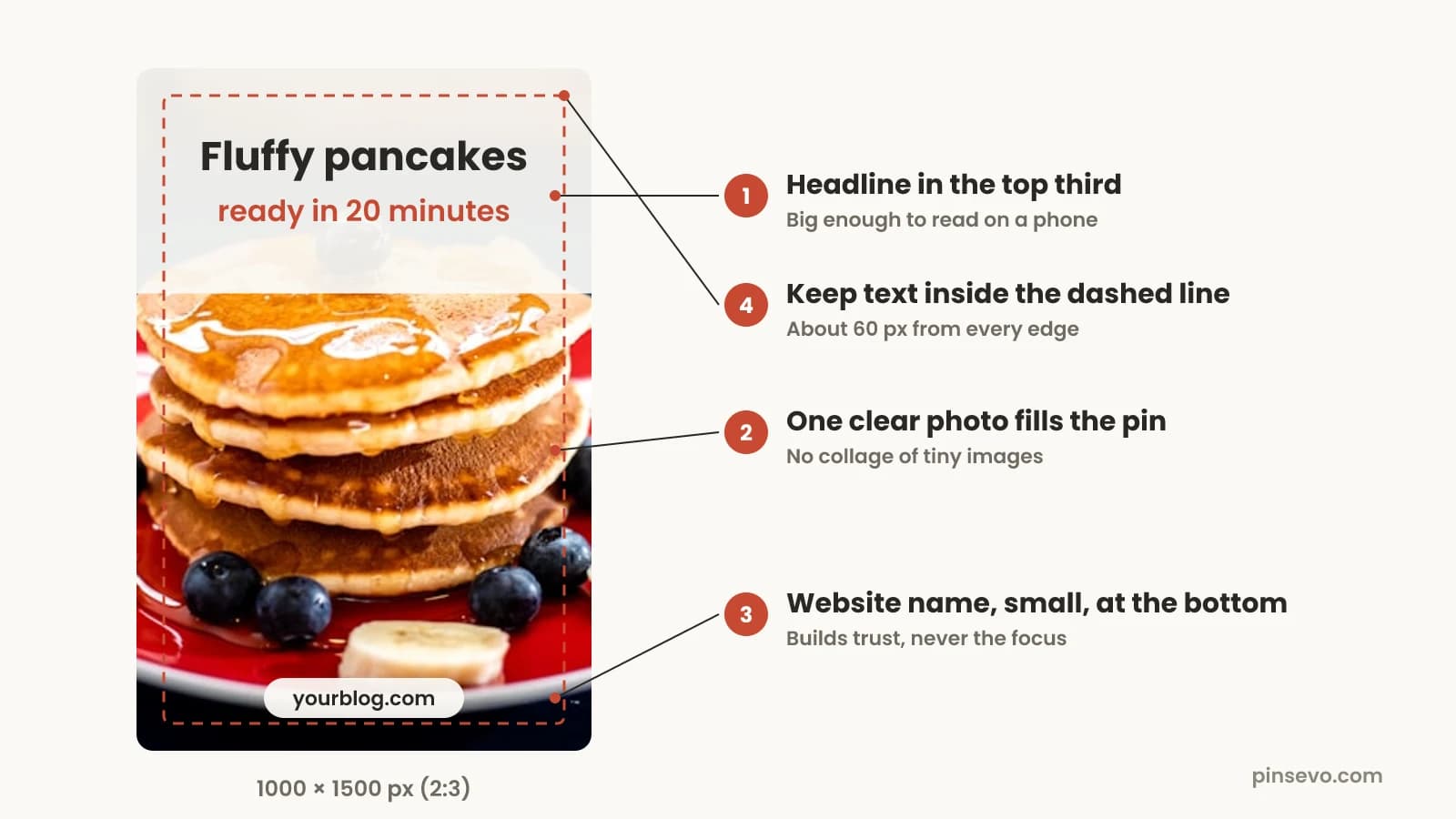
- Put the headline in the top third. That's where eyes land first, and it's the part that survives any cropping.
- Make the text big. If you can't read it on your phone with the pin at thumbnail size, it's too small. Five to eight words is plenty.
- Let the photo fill the pin. Edge-to-edge images look better in the feed than a small photo floating on a plain background.
- Add your website name small at the bottom. It builds recognition without competing with the headline.
- Keep text inside a safe margin, about 60 pixels from each edge on a 1000 x 1500 pin. Pinterest rounds the corners of pins and puts icons on top in some views, so text right at the edge can get clipped.
Pinterest's pin specs page also lists its own safe zones (270 px at the top, 65 px left, 195 px right and 790 px at the bottom) for keeping text visible on any device. Those numbers are large because, in full-screen views, the title, buttons and profile name sit over the image. They matter most for 9:16 full-screen pins and video. For a regular 2:3 pin, keeping text in the top two thirds and away from the edges does the same job.
The words on the image also help Pinterest understand what the pin is about. Our Pinterest SEO guide explains how to use the text on the pin, the title and the board together, and the Pinterest keywords guide shows how to find the right words.
How to set the Pinterest pin size in Canva
In Canva, you can either start from a Pinterest pin template or make a custom-size design at 1000 x 1500 pixels. Canva's own Pinterest pin templates are labeled 1000 x 1500, so either way you end up at the 2:3 size Pinterest recommends.
- Open Canva and choose to create a design.
- Search for "Pinterest pin" and pick the Pinterest pin design type or a template, or choose custom size.
- For a custom size, set the units to pixels and enter 1000 wide by 1500 tall.
- Design your pin: headline in the top third, photo filling the space, website name at the bottom.
- Download as JPEG for photo pins or PNG for text-heavy pins.
- Check the file on your phone before you upload. If the headline is hard to read at thumbnail size, make it bigger.
Canva's menus change from time to time, so the exact button names may differ, but the size is what matters: 1000 x 1500 pixels. The same works in any design app: set a 2:3 canvas in pixels and export. If you'd rather skip the design step, our free Pinterest pin maker makes 2:3 pins from a link or photo.
Does pin size affect how many people see your pins?
Size helps your pin get noticed, but it doesn't decide whether Pinterest shows it. Pinterest shows pins based on how well they match what people search for and how people react to them. A perfect 2:3 pin with vague words still struggles. Our post on how the Pinterest algorithm works covers what actually drives reach.
Where size does matter is the click. A pin that fills more of the screen, reads clearly and isn't cut off gets more saves and clicks than a small square or a trimmed long pin. Those reactions then tell Pinterest to show it to more people. So the right size is a small, free win that makes everything else work a little better.
Size also matters when you post a lot. If you make several pins for each blog post or listing, using one fixed size and layout means you can swap photos and headlines in minutes. Say you run a 40-post baking blog and want three fresh pins per post: that's 120 pins, and a fixed 1000 x 1500 template is what makes that doable. Tools like Pinsevo do this from your website: it makes 2:3 pins for each page, writes the titles and descriptions, and posts the ones you approve at the pace you set. Check how many pins a day to post before you plan the schedule.
Pinterest pin size checklist
Run through this before you upload. It takes under a minute:
- Is the pin 1000 x 1500 pixels (2:3), or 1080 x 1920 (9:16) for video?
- Is it no taller than 1:2.1, so nothing gets cut off in the feed?
- Is the file a JPEG, PNG or WEBP under 20 MB?
- Is the headline in the top third, big enough to read on a phone?
- Is all text at least about 60 pixels from every edge?
- Does the photo fill the pin, without a plain white border?
- Is your website name on it, small, near the bottom?
- Does the pin link to the exact page or listing it shows?
Quick answers
What size is a Pinterest pin in pixels?
The standard Pinterest pin size is 1000 x 1500 pixels, a 2:3 ratio. Any size with the same ratio, like 1200 x 1800 or 2000 x 3000, also works.
Is 9:16 good for Pinterest pins?
Yes for video: Pinterest recommends 9:16 (1080 x 1920) for full-screen video pins. For still images, 2:3 is the safer choice because it's Pinterest's recommended image size and leaves more room before the feed cuts anything off.
What is the maximum Pinterest pin length before it gets cut off?
Pins taller than a 1:2.1 ratio get truncated in the feed. At 1000 pixels wide, that means anything taller than 2100 pixels.
What is the Pinterest image size limit?
Image pins can be up to 20 MB when uploaded on the web, in BMP, JPEG, PNG, TIFF or WEBP format. Image ads must be PNG or JPEG, up to 20 MB on desktop or 32 MB in the app.
What is the Pinterest pin size in inches?
Pins are measured in pixels, not inches. If you need print sizes, a 1000 x 1500 pin prints at 3.33 x 5 inches at 300 dpi, or 6.67 x 10 inches at 150 dpi.
What size should a Pinterest pin be in Canva?
Use Canva's Pinterest pin template or a custom size of 1000 x 1500 pixels. Download photo pins as JPEG and text-heavy pins as PNG.
What size is the Pinterest profile cover?
Pinterest asks for a profile cover of at least 800 x 450 pixels and recommends a horizontal 16:9 image. 1920 x 1080 is a good size to use.
Are square pins bad on Pinterest?
Square pins (1:1) work and are allowed, but they take about a third less space in the feed than a 2:3 pin. Use them for product photos you already have, and make 2:3 versions of your best ones.