To sell digital products on Pinterest, you make pins that show the product in use and link each one to the page where people can buy it: your own site, Etsy, Gumroad, Payhip, Stan or Shopify. Pinterest itself doesn't take the payment; buyers check out on your product page. Use the words buyers search for, post fresh pins every week, and expect three to six months before sales feel steady.
Can you sell digital products on Pinterest?
Yes. You sell digital products on Pinterest by making pins that link to the page where the product is sold. Pinterest is where people find the product. The sale happens on your shop page.
It's a good fit because people use Pinterest to plan. They search "budget planner printable", "nursery wall art" or "kindergarten worksheets" when they are about to organize, decorate or teach something. A digital product is often the exact thing they need, and it can be bought and downloaded in two minutes.
The audience is large. Pinterest reported 640 million monthly active users in its Q2 2026 results, its highest number so far. Most of them aren't looking for a brand. They're looking for an idea, which means a small shop with a good pin can show up next to anyone.
Digital products have one more advantage on Pinterest: nothing ever sells out. A pin you post today can keep sending buyers to the same listing for a year or more, and you never have to restock or change the link.
Can you sell directly on Pinterest?
Not in the sense of a checkout inside Pinterest. Pinterest's help center says product pins "direct you to the merchant's website", so buyers always finish the purchase on your site or shop. Your job on Pinterest is to get the click. You can read that in Pinterest's own shopping help page.
There are a few shopping features worth knowing about, and they work a little differently for digital sellers:
- Product rich pins: pins that pull the price and availability from your product page. You add product markup to your site, and Pinterest says pages on Etsy don't need any markup at all. See Pinterest's rich pins guide.
- Catalogs: a product feed that turns every product into a pin at once, used for shopping ads. You need a business account, a claimed website, the Pinterest tag, and a site with easy-to-find contact details, shipping policy and refund policy, per Pinterest's catalogs checklist. It isn't available in every country.
- Verified Merchant Program: a badge for shops that meet Pinterest's merchant guidelines. Digital-only shops on community forums report a harder time getting approved, often over shipping and return policy pages.
For most small sellers of printables and templates, plain pins that link to the product page do the heavy lifting. Catalogs and ads are something to try later, once you know which products people click.
Which digital products sell well on Pinterest?
Products that help people plan, organize, decorate, teach or create sell best, because that's what people come to Pinterest to do. If a buyer would save it to a board called "home office ideas" or "homeschool", it has a chance.
| Product type | Example search | Pin idea | Where to link |
|---|---|---|---|
| Printable planners | budget planner printable | Flat lay of filled-in pages next to a coffee | The planner's product page |
| Digital planners (GoodNotes, Notability) | digital planner ipad | Tablet screen showing tabs and a flip-through | The planner listing |
| Printable wall art | boho nursery wall art | Prints framed in a styled room | The print or the set it belongs to |
| Canva templates | instagram templates canva | Grid of finished templates, "30 templates" text | The template bundle page |
| Worksheets | kindergarten math worksheets | A sheet on a table with crayons, one page close up | The worksheet pack |
| Ebooks and guides | meal prep guide | Cover plus two inside pages | The sales page |
| Online courses | learn watercolor for beginners | One lesson's result, "what you'll make" | The course sales page |
| Lightroom presets | warm lightroom presets | Before and after of one photo | The preset pack |
| SVG and cut files | teacher svg cricut | The finished shirt or mug made with the file | The SVG listing |
| Party printables | printable birthday invitation | The invitation on a party table | The invitation listing |
Notice the pattern in the "pin idea" column. You don't pin the file. You pin the result: the finished wall, the filled-in planner, the edited photo. That's what people search for and save.
How to sell digital products on Pinterest: step by step
Setup takes an afternoon. After that, the work is making pins and posting them steadily. Here's the order to do it in:
- Make a free Pinterest business account, or switch your personal one to business in settings. It gives you analytics and lets you claim your shop. Our Pinterest business account guide covers each setting.
- Claim your website and your Etsy shop under Settings, then Claimed accounts. This puts your name on pins that link to your products, even when other people save them.
- Turn on product rich pins if you sell from your own site. Shopify and most store builders add the product markup for you. Etsy listings work without any setup.
- Make five to ten boards named the way buyers search: "Printable planners", "Nursery wall art", "Canva templates for small business". Add a one-line description to each.
- Pick your best five products to start with. Don't try to pin your whole catalog in week one.
- Make three to five different pins for each of those products, with different photos and text on the image.
- Write a title and description for each pin using the words buyers type into Pinterest search.
- Link every pin to the exact product page it shows.
- Schedule the pins over the next few weeks so a few fresh ones go out every day, instead of all at once.
- After a month, check which products get clicks and make more pins for those.
How to sell digital products on Pinterest without a website
You don't need your own website. A pin can link to any product page, so you can sell through a marketplace or a creator storefront and point your pins there. What matters is that the link lands on one product with a clear buy button.
Here are the common options, described plainly. Fees and features change, so check each one's current pricing before you pick:
- Etsy: a marketplace with buyers already searching it. Good for printables, wall art, planners and SVG files. Each listing has its own page, which is ideal for pins. Our guide on using Pinterest for Etsy covers the Etsy side in detail.
- Gumroad: a simple checkout page for each product. Popular with creators selling ebooks, templates, presets and courses.
- Payhip: a free-to-start store for digital downloads, memberships and courses, with a page for each product.
- Stan: a link-in-bio storefront aimed at creators, with products, free downloads and booking on one page.
- Shopify: a full online store that you own and design. More setup, but it gives you your own domain, which helps if you later want Pinterest catalogs.
Whichever you use, test the link on your phone before pinning. Most Pinterest users are on mobile, and a product page that loads slowly or asks them to log in loses the sale.
How to get sales from Pinterest: the two paths
There are two ways a pin turns into a sale. The direct path sends the click straight to a product page. The email path sends it to a free download first, then sells later by email. Most digital sellers use both.
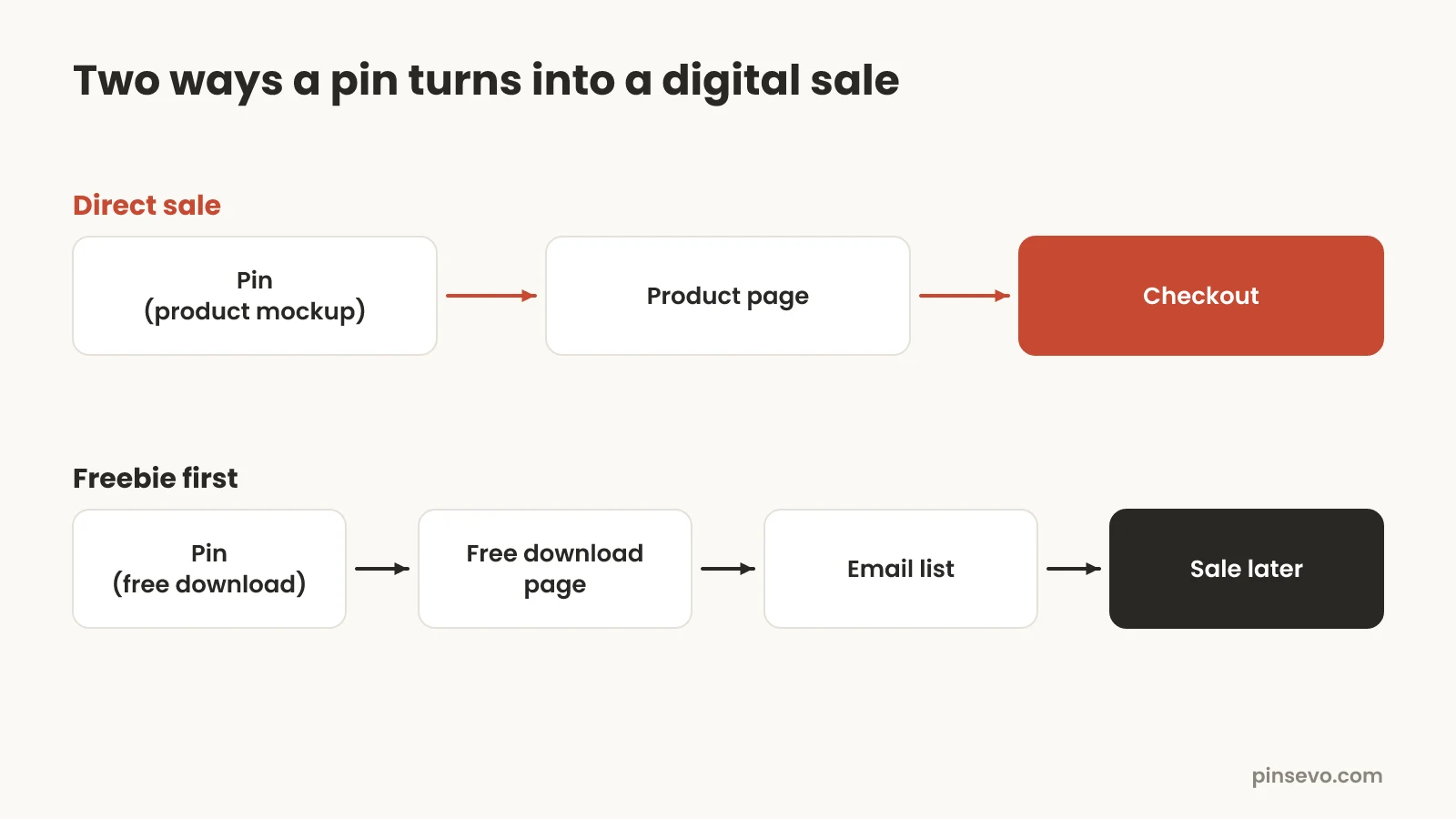
- Direct: pin, then product page, then checkout. Best for cheap, easy-to-understand products like a $5 printable or a $12 wall art set. The buyer doesn't need convincing, just a good picture and a clear price.
- Email: pin, then a free download page, then your email list, then a sale a few days or weeks later. Best for bigger products like a $49 course or a $30 planner bundle, where people want to try you first.
A freebie should be a small piece of the paid product. If you sell a 60-page budget planner, give away a one-page monthly budget sheet. The people who download it are exactly the people who might want the full planner.
Then send a short welcome series: deliver the freebie, share one tip on using it, show the full product, and offer it. Keep it to three to five emails. Even a modest list built from Pinterest becomes a steady source of sales, because you're not waiting for each person to find a pin again.
Keyword research for digital product pins
Pinterest marketing for digital products starts with words. Pinterest matches pins to searches using your title, description, text on the image and board names, so you need the phrases buyers actually type.
The free way: type the start of your product into the Pinterest search bar and look at the suggestions that drop down. Those are real searches. Then search one and note the small bubbles under the bar for related terms. Our Pinterest keywords guide walks through the full method.
| Too vague | What buyers search |
|---|---|
| Planner | 2027 printable planner, weekly planner printable, adhd planner |
| Wall art | neutral living room wall art, boho nursery prints, kitchen wall art printable |
| Template | canva templates for coaches, etsy shop banner template |
| Worksheet | first grade reading worksheets, free printable handwriting practice |
Add the format to your words when it matters. "Printable", "digital download", "editable", "Canva" and "GoodNotes" tell people (and Pinterest) that this is a file, not a physical item. Someone searching "wall art" may want a canvas shipped to them. Someone searching "printable wall art" wants exactly what you sell.
Best Pinterest pin ideas for digital products
The best pins for digital products show what the buyer gets and how it looks in real life. A plain screenshot of a PDF rarely gets saved. Try these formats and keep the ones that get clicks:
- Mockups: the print in a frame on a wall, the planner on a desk, the template on a phone screen. Use your own photos or less common mockups, not the same five that every shop uses.
- "What's inside": a grid of six to nine pages with text like "45 pages, instant download". This answers the first question buyers have.
- Before and after: one photo with and without your preset, or a messy Instagram grid next to one made with your templates.
- Lifestyle shots: a parent using a worksheet with a child, a planner with a coffee and a pen. People buy the feeling of being organized.
- Short video: a 10 to 15 second flip-through of the pages. It shows the product in a way a still pin can't.
- Problem pins: text like "Finally stick to a budget" over a photo of the planner. Lead with what it fixes.
Make pins tall (2:3, like 1000 by 1500 pixels) with text big enough to read on a phone. Our Pinterest pin size guide has the exact numbers.
A note on mockups: if you make them with AI tools or AI editing features, Pinterest may add an "AI modified" label, which can reduce reach in some categories. Read what the AI modified label means before you build all your pins that way. Real photos of the printed product are the safest choice.
How many pins per product, and how often?
Make three to five different pins for each product to start, and post a few fresh pins a day across your whole shop. Different images and titles for the same product reach different searches and show you which angle works.
Steady beats a burst. Two to five new pins a day, every day, will do more than fifty pins on one Sunday and then nothing for a month. Space pins for the same product about a week apart. See how many pins a day to post for numbers by account size.
Say you sell 20 printables. Five pins each is 100 pins, which is about seven weeks of posting at two a day. By the time you finish, you'll know your top five products, and you can make another round of pins just for those.
This is the part most sellers stop doing by month two. If making and scheduling that many pins is the bottleneck, Pinsevo can read your product pages (from a website or an Etsy shop), make several pins for each one, and post the ones you approve at the pace you choose.
When to pin seasonal digital products
Pin seasonal products 6 to 12 weeks before buyers need them. People on Pinterest save ideas early and buy later, so a pin that goes up the week of the holiday is usually too late.
Q4 is the biggest season for many digital sellers. Planners and calendars for the new year start selling in the fall, and Christmas printables, gift tags and holiday cards get searched from September onward. Our guide on when to start Christmas pins has the full timeline.
| Product | Start pinning | Peak buying |
|---|---|---|
| Next year's planners and calendars | September | November to early January |
| Christmas printables, tags, cards | October | Late November to mid-December |
| Valentine's cards and classroom printables | Early January | Late January to early February |
| Back-to-school worksheets and teacher templates | June | July to early September |
| Wedding templates and signs | Any time, extra in winter | Spring and summer |
Common mistakes when selling digital products on Pinterest
Most sellers who give up on Pinterest make one of a few fixable mistakes. Check your pins against this list:
- Linking to your shop home page. Someone who clicks a budget planner pin wants that planner. Send them to the product, not your storefront.
- Tiny text. Text that looks fine on a laptop is unreadable in a phone feed. Use five to eight words in a large, simple font.
- Stock mockups everyone uses. If your frame-on-a-white-wall mockup appears in a hundred other shops, your pin blends in. Use your own photos or change the scene.
- Pinning the file, not the result. A flat PDF page doesn't show why it's useful. Show it filled in, printed, framed or in use.
- No keywords. Titles like "New in the shop!" tell Pinterest nothing. Name the product the way buyers search for it.
- Hiding the format. If people don't realize it's a download, you'll get confused clicks and refund requests. Say "printable" or "digital download" on the pin.
- Quitting too early. Pinterest traffic grows slowly. Stopping in month two throws away the pins that were about to start working.
How long does it take to get sales from Pinterest?
Expect three to six months before sales from Pinterest feel steady. New pins take a few weeks to be found in search, and buyers often save a pin long before they buy.
Here's a realistic timeline for a shop posting a few fresh pins a day. It isn't a promise; your niche, prices and pins all change it.
| Time | What you'll usually see |
|---|---|
| Weeks 1 to 4 | Impressions start. A few saves. Clicks are low. |
| Months 2 to 3 | Some pins start ranking. Saves and outbound clicks grow. First sales and freebie signups. |
| Months 4 to 6 | A handful of pins bring most of the clicks. Sales become more regular. |
| Months 6 to 12 | Older pins keep working while new ones add to them. Seasonal pins from last year come back. |
Judge progress by outbound clicks and sales, not followers. Our guide to Pinterest analytics shows which numbers to watch and where to find them.
Checklist: before you pin your next digital product
Run through this before each new product goes on Pinterest:
- The pin links to the exact product page, and the page works on a phone.
- The title starts with the words buyers search, including "printable", "template" or "digital download".
- The image shows the product in use, not a flat file.
- Text on the image is short and readable on a phone.
- You have three to five different pins ready for this product.
- The pins are scheduled over several weeks, not posted at once.
- Seasonal products are pinned 6 to 12 weeks early.
- You have one free download for your best-selling product type, linked from at least one pin.
Quick answers
Can you sell digital products on Pinterest?
Yes. You make pins that show the product and link each one to the page where it's sold, on your own site, Etsy, Gumroad, Payhip, Stan or Shopify. Buyers click through and pay on that page.
Can you sell directly on Pinterest?
Not with a checkout inside Pinterest for most sellers. Pinterest's product pins send buyers to the merchant's website to complete the purchase.
How do I sell printables on Pinterest?
List the printable on Etsy or your own store, then make several tall pins showing it printed and in use. Use search words like "printable" in the title and link each pin to that printable's product page.
Can I sell digital products on Pinterest without a website?
Yes. Link your pins to a product page on Etsy, Gumroad, Payhip, Stan or a similar platform. Any page with one product and a clear buy button works.
What digital products sell best on Pinterest?
Things people use to plan, organize, decorate, teach or create: printable planners, digital planners, wall art, Canva templates, worksheets, presets, SVG files, ebooks and courses.
Is Pinterest good for Etsy digital products?
Yes. Etsy listings work as product rich pins without any setup, and each listing has its own page to link to. Pinterest buyers are often still planning, so a pin can reach them before they compare shops on Etsy.
How many pins should I make per digital product?
Start with three to five different pins per product, with different images and titles. Post a few fresh pins a day across your shop and space pins for the same product about a week apart.
How long does it take to make sales on Pinterest?
Usually three to six months before sales feel steady. The first weeks bring impressions and saves, and clicks and sales grow as your pins start ranking in search.