
Pinterest marketing for small business means posting pins that link to your products or posts, written with the words people search for, so buyers find you while they plan. Set up a free business account, build a keyword list, make 5 to 10 boards, and post fresh pins every week. Give it 90 days, then make more of whatever gets clicks.
What is Pinterest marketing, and how does it work for small businesses?
Pinterest marketing is posting pins that link back to your website, shop or listings, so people who search Pinterest for ideas find your products and click through. For a small business, it works more like search marketing than social media: you're not trying to entertain followers, you're trying to show up when someone types "handmade coffee mugs" or "easy sourdough recipe".
Here's how it works in practice. You make a pin: a tall image, a title, a short description and a link. Pinterest reads the words and the picture, works out the topic, and shows the pin in search results and in the home feeds of people interested in that topic. When someone likes what they see, they save it or click through to your page.
The big difference from Instagram or TikTok is shelf life. A post on most social apps fades after a day or two. A good pin can keep turning up in search for months, and some keep sending visitors for years. That's why Pinterest marketing for small business rewards steady, patient work more than viral luck. If you're weighing the two platforms, our Pinterest vs Instagram comparison breaks down the differences.
Is Pinterest good for small business?
Yes, if you sell something people plan, browse or make, and you have a website or shop to send them to. It's a weaker fit for businesses that only serve a small local area, because Pinterest shows pins to people everywhere, not just in your town.
The audience is large and it comes to shop. Pinterest reported 640 million monthly active users worldwide in its Q2 2026 results, an all-time high. Its business audience page says 96% of top searches are unbranded, and that Gen Z, now about half of its global users, mainly uses Pinterest to find information about products and brands. Unbranded means people search for "linen bedding", not a company name. So a small shop with good pins can compete with big brands in search.
| Business type | Fit | Why |
|---|---|---|
| Etsy and Shopify shops (decor, jewelry, gifts, prints) | Great | People save gift and decor ideas, then buy later |
| Bloggers (food, DIY, travel, home, parenting) | Great | Every post can become several pins that send traffic for months |
| Digital products (printables, planners, templates) | Great | Shows well in a pin and sells to anyone, anywhere |
| Ecommerce brands in fashion, beauty, home or kids | Good | Visual products with lots of searches behind them |
| Coaches, course creators, B2B services | Mixed | Works if you teach through helpful posts people want to save |
| Local services (plumber, dentist, hair salon) | Weak | Most people who see your pins can't book you |
If you're a local service, Pinterest isn't useless. A wedding florist or interior designer can still win clients with a strong portfolio, since couples and homeowners plan on Pinterest. But a plumber's time is better spent on Google Business reviews. Be honest about which group you're in before you commit hours each week.
Pinterest marketing for small business in 5 parts: start with goals and keywords
A simple Pinterest marketing strategy for 2026 has five parts: a goal, a keyword list, boards, pins and a posting schedule. Get the first two right and the rest gets much easier, because every board and pin is built on them.
- Goal: pick one thing Pinterest should do for you, like sending visitors to product pages or blog posts. Most small businesses should choose website traffic, because sales and email signups follow from it.
- Keywords: write down 20 to 40 phrases your buyers search for. Type the start of what you sell into the Pinterest search bar and note the suggestions. Click one and look at the related terms that appear under the search bar.
- Boards: group those keywords into 5 to 10 board topics.
- Pins: make fresh pins for your key pages, using the keywords in the title, description and text on the image.
- Schedule: post a few fresh pins steadily every week, and start seasonal pins early.
On keywords, sort your list into three groups: product words ("soy candle"), use words ("cozy bedroom ideas") and occasion words ("teacher gift"). Shoppers search all three, and the last two are where small businesses often find less crowded searches. Our Pinterest keywords guide walks through the full method, and Pinterest SEO shows where each keyword goes.
How to set up boards and make pins that get clicks
Boards tell Pinterest what your pins are about, and pins do the actual selling. Name boards after real searches, and make pins tall, clear and linked to the exact page they show.
Start with 5 to 10 boards. Use a mix: some named after what you sell, some after the wider topic your buyers care about. A candle shop might have "Soy candles", "Cozy bedroom ideas", "Fall home decor" and "Gifts for her". Nobody searches for "New Arrivals" or "My Shop", so skip names like those. Add a one-sentence description to each board using the same words.
Then make pins that someone scrolling fast would stop for:
- Use a 2:3 shape, like 1000 by 1500 pixels. Our Pinterest pin size guide covers every format.
- Show the product in use or the finished result, not just a plain cutout.
- Add a few words of text on the image that say what it is: "Easy fall wreath you can make in an hour".
- Put the main keyword at the start of the title, and write a two or three sentence description for a person, not a robot.
- Link each pin to the exact product or post it shows, never just your home page.
- Make several different pins for each important page, with new photos, text and titles.
That last point matters most. Pinterest prefers fresh pins, meaning images and words it hasn't seen before. Each new pin for the same page is another chance to show up in a slightly different search. If designing pins is the part you'll never get to, our free Pinterest pin maker turns a link or photo into a pin in the right size.
How often to post on Pinterest, and when to start seasonal pins
Post fresh pins steadily, a few per week at minimum and one to a few per day if you can keep it up. Steady beats bursty: 3 pins a day for 90 days does far more than 100 pins in one weekend and then silence.
For most small businesses, 1 to 5 fresh pins a day is a sensible range. Our guide on how many pins per day explains how to choose a number based on how many pages you have.
Timing matters even more than volume for seasonal products. People use Pinterest to plan, so they search for holidays and seasons weeks or months before they happen. Pins also need time to get picked up and start ranking. Start seasonal pins 45 to 90 days before the season people search for.
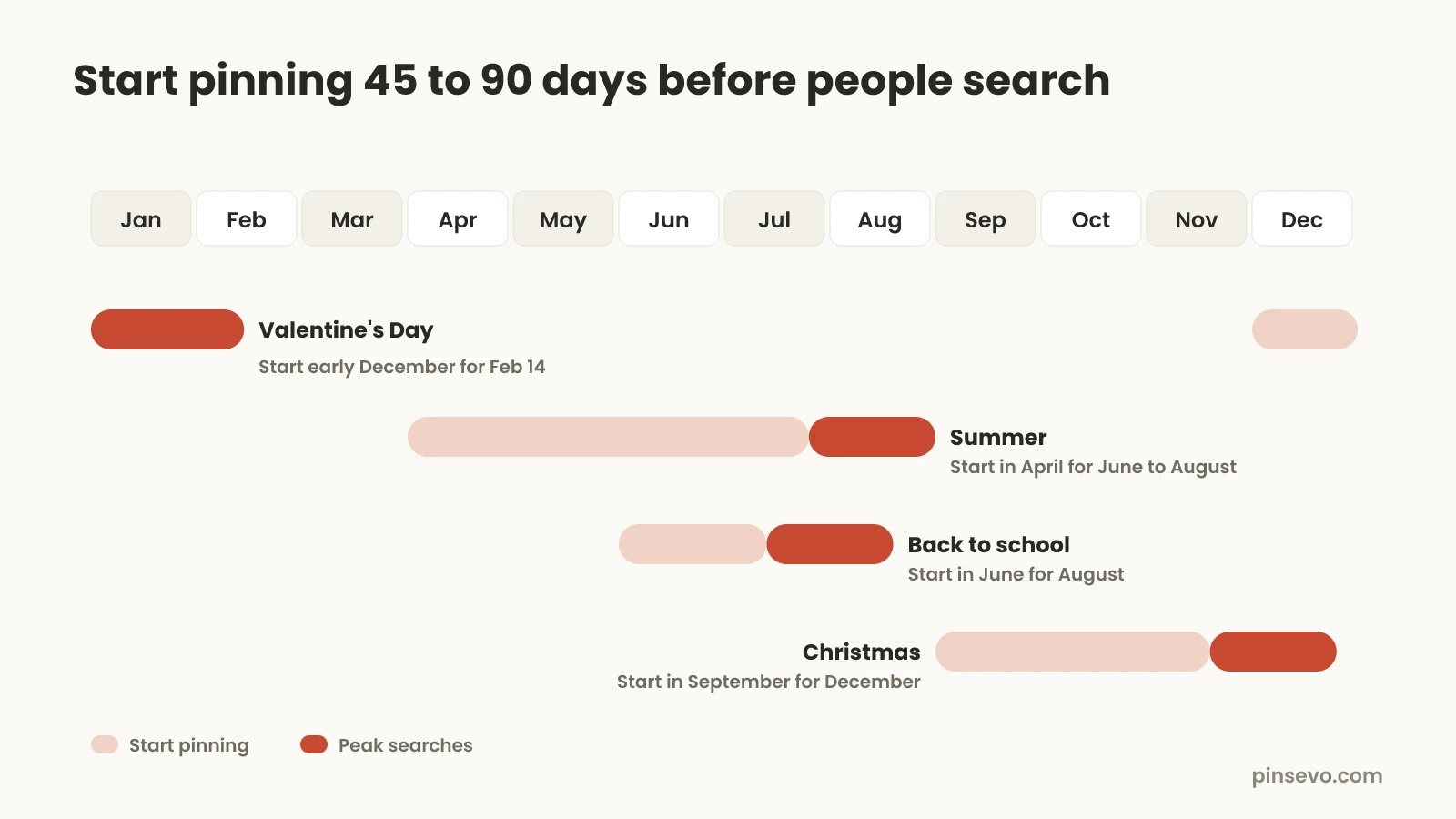
- Valentine's Day: start pinning in early December.
- Summer (outdoor, travel, BBQ): start in April.
- Back to school: start in June.
- Halloween and fall decor: start in July or August.
- Christmas and holiday gifts: start in September.
Our free Pinterest content calendar lists start dates for the main holidays, so you can plan a whole year in one sitting.
A 90-day Pinterest plan for beginners: days 1 to 14, set up
If you're new, follow a simple 90-day plan in three phases: set up in the first two weeks, pin steadily until day 60, then measure and double down on what works. Ninety days is about the shortest time that gives you real data, because pins often take weeks to start ranking.
The first two weeks are about foundations. Nothing here is hard, and you only do it once.
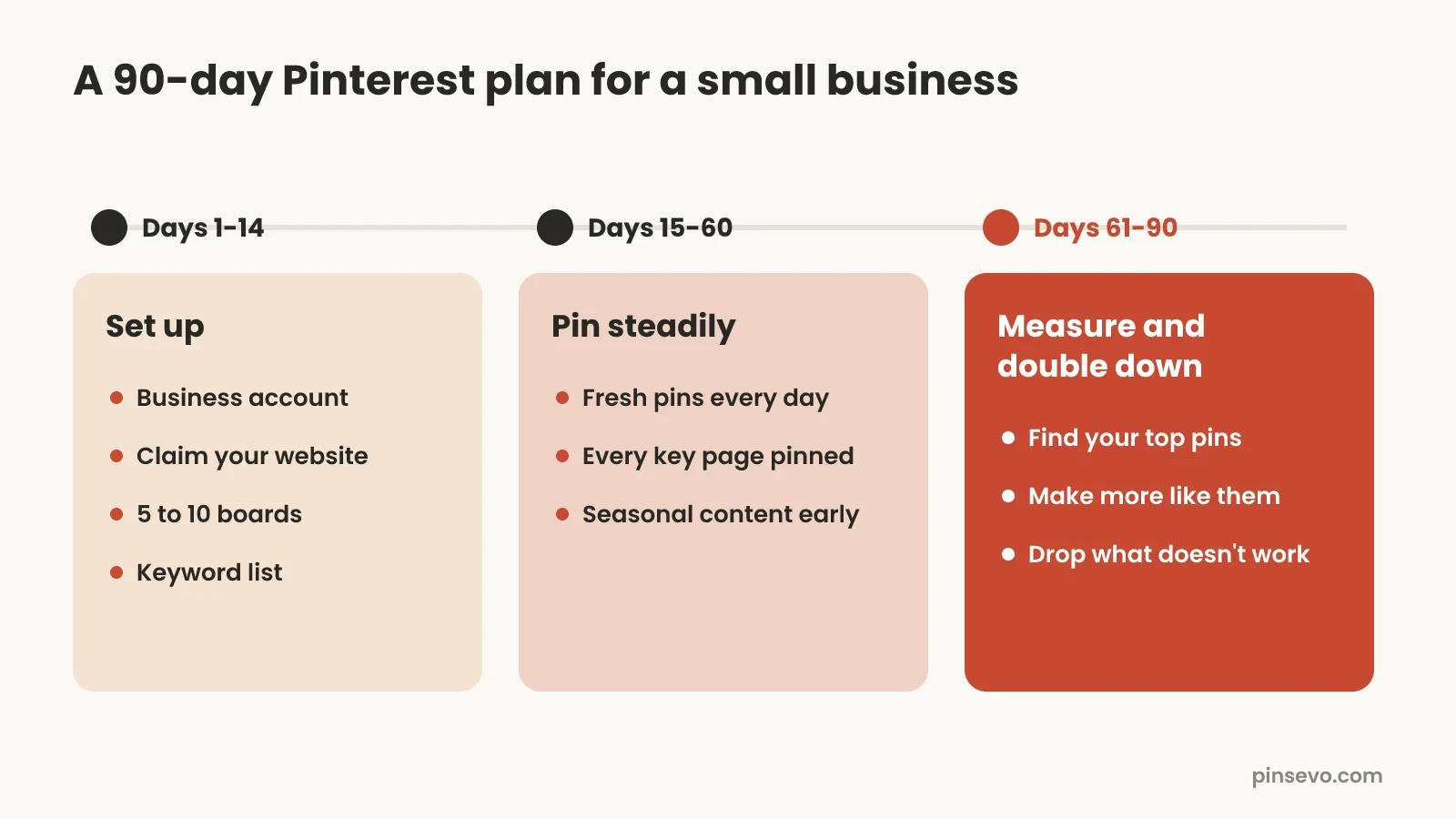
- Create a free Pinterest business account, or switch your personal one to business in the settings. Our Pinterest business account guide covers every setting.
- Claim your website (and your Etsy shop if you have one) under Settings, then Claimed accounts. Pins from your site then carry your name.
- Write a profile name and bio with the words people use to find what you do, like "Willow Candle Co | Soy candles and cozy home gifts".
- Build your keyword list of 20 to 40 search phrases.
- Create 5 to 10 boards named after those searches, each with a short description.
- List your 10 to 20 most important pages: best sellers, top blog posts, and anything seasonal coming up in the next three months.
- Make your first batch of pins for those pages, two or three per page.
Days 15 to 60: pin steadily
The middle phase is about showing up every day or every week without gaps. This is where most small businesses quit, usually around week six, right before pins start picking up in search.
- Post fresh pins on a steady rhythm, ideally daily. Pick a number you can keep up for all six weeks, even if it's only one a day.
- Work through every key page, so each product or post has at least two or three different pins.
- Add seasonal pins early, using the 45 to 90 day rule above.
- Make new pins for your best pages with different photos, text on the image and titles.
- Use Pinterest's scheduler or a tool so a busy week doesn't break the streak.
- Don't judge results yet. Look at analytics once a week, but don't change course based on a few days of numbers.
Here's a hypothetical example. Say you run a candle shop with 30 products. Posting two fresh pins a day, you'd make about 90 pins in this phase: three per product. Some would show the candle lit on a nightstand, some styled as a gift, and some aimed at a season, like "cozy fall candles" pins going out in August.
Days 61 to 90: measure and double down
In the last phase, you find the pins and pages that work and make more like them. You don't need deep analytics for this. A few numbers are enough.
Open Pinterest Analytics in your business account and sort your pins by outbound clicks, which count how often people went from a pin to your site. Saves are a good early sign that a topic has demand. Impressions alone mean little: lots of views with no saves or clicks usually means the pin is showing up but not appealing. Our Pinterest analytics guide explains each number in detail.
- Find your top 10 pins by outbound clicks and your top 10 by saves.
- Note what they share: a topic, a photo style, a kind of headline, a board.
- Make 3 to 5 new pins for each winning page, using the same angle with fresh images and titles.
- Prune what doesn't work: stop making pins for topics that got no saves after 60 days, and move that time to winners.
- Check that every winning pin still links to a live page. Sold-out products and deleted posts waste good traffic.
- Set your posting rhythm for the next 90 days based on what you could actually keep up.
How much time does Pinterest marketing take each week?
Plan on 2 to 5 hours a week if you make and post pins yourself, after a setup week of 4 to 6 hours. Most of that time goes to designing pins and writing titles and descriptions, not to posting.
| Task | Time per week (by hand) | Notes |
|---|---|---|
| Picking pages and keywords | 20 to 30 minutes | Faster once your keyword list exists |
| Designing pins | 1 to 3 hours | About 5 to 10 minutes per pin with templates |
| Writing titles and descriptions | 30 to 60 minutes | Our free description generator speeds this up |
| Scheduling and posting | 15 to 30 minutes | Batch it once a week |
| Checking analytics | 15 minutes | Once a week is enough |
| Total | About 2 to 5 hours | For roughly 7 to 21 fresh pins a week |
The fastest way to cut this is batching. Pick one afternoon a week, make all the pins for the week, and schedule them. Switching between tasks every day is what makes Pinterest feel like a second job.
Organic Pinterest vs Pinterest ads: which should you start with?
Start organic. Free pins build traffic that keeps coming for months, and they show you which products people actually want. Add ads later, behind pins that already get saves and clicks.
Ads have real strengths. They get you seen right away, you can target by interest and keyword, and they help with short sales windows like a holiday launch. The trade-off is that the traffic stops when you stop paying, and ads on pins nobody saves are an expensive way to learn what doesn't work.
A fair middle path for a small budget: run organic for 90 days, then spend a modest test budget promoting your two or three best organic pins during your busiest season. That way the ad money goes behind pins you already know people like.
Which Pinterest marketing tools do you need?
You can do Pinterest marketing for free with Pinterest's own tools. Paid tools mainly save time on making pins and posting them on a schedule. Pick the one that removes the step you're most likely to skip.
| Tool | What it's good for | Keep in mind |
|---|---|---|
| Pinterest's built-in scheduler | Free scheduling while you create a pin, up to 30 days ahead | You schedule one pin at a time, and there's a limit on how many can be queued |
| Canva | Free and paid pin templates in the right size | You still write and post every pin yourself |
| Tailwind | A long-running Pinterest scheduler with a queue, pin designs and analytics | Has a free plan with limits; more posting needs a paid plan |
| Pinsevo | Turns your website pages or Etsy listings into pins, writes keyword-rich titles and descriptions, posts the ones you approve | Best when you have lots of pages to pin; you still review every pin |
If you're already comparing schedulers, our Tailwind alternative comparison lays out the differences honestly. Whatever you pick, check three things: every pin links to the right page, nothing posts without your OK, and you control how many pins go out each day.
Common Pinterest marketing mistakes small businesses make
Most Pinterest accounts that fail don't fail because of the platform. They fail because of a few fixable habits.
- Quitting at week six. Pinterest is slow to start. Judge it at 90 days, not 30.
- Treating it like Instagram. Chasing followers and posting behind-the-scenes photos without keywords gets little reach. Search words get reach.
- Linking pins to the home page. People who click a pin of a product want that product page.
- Re-saving the same pin over and over. Pinterest rewards fresh pins. Make new images instead.
- Vague board and pin titles like "Favorites" or "New in!". Name them the way buyers search.
- Pinning seasonal products late. A Christmas pin posted in December misses most of the planning window.
- Posting in bursts. 50 pins in a day, then nothing for a month, is worse than 2 a day all month.
- Using square or wide images. Tall 2:3 pins get more space in the feed.
Pinterest marketing for small business: your checklist
Run through this list once at the start, then come back to it every 90 days.
- Free business account set up, with a keyword-rich profile name and bio
- Website and shop claimed under Settings, then Claimed accounts
- One clear goal, usually website traffic
- A keyword list of 20 to 40 real Pinterest searches
- 5 to 10 boards named after those searches, each with a description
- Tall 2:3 pins with clear text on the image
- Main keyword at the start of every pin title
- Every pin linked to the exact page it shows
- A posting rhythm you can keep for 90 days
- Seasonal pins scheduled 45 to 90 days ahead
- A weekly 15-minute look at outbound clicks and saves
- More pins for the winners at day 90, fewer for topics that didn't land
Quick answers
Is Pinterest good for small business?
Yes, for businesses that sell things people plan, browse or make, like shops, bloggers and digital product sellers. It's a weaker fit for purely local services, because pins reach people everywhere.
How do I use Pinterest for my small business?
Set up a free business account, claim your website, and build a list of keywords your buyers search for. Make 5 to 10 boards around those keywords, then post fresh pins that link to your products or posts every week.
How long does Pinterest marketing take to work?
Expect around three months of steady posting before traffic feels reliable. Pins often take weeks to start ranking, then keep sending visitors for months.
How do I grow on Pinterest fast and organically?
Post fresh pins every day or every week, with keywords in the title, description and image text, and link each one to a matching page. Then make more pins like your top performers. There's no shortcut, but steady posting with good keywords is the fastest honest path.
How do I get more views on Pinterest?
Use the words people search for, make tall 2:3 pins with clear text, and post fresh pins steadily rather than in bursts. Pin seasonal content 45 to 90 days early so it's ranking when searches peak.
Is Pinterest good for ecommerce?
Yes. Pinterest says most top searches are unbranded and that many users come to find products, so ecommerce shops with visual products can be found by new buyers without paying for ads.
Do I need to pay for Pinterest ads?
No. Organic pins are free and can bring traffic for months. Ads are worth testing later, behind pins that already get saves and clicks.
How many pins should a small business post?
One to five fresh pins a day is a sensible range for most small businesses. Posting steadily matters more than posting a lot.